Category Archives: VMware

Migrate vSphere VM to Proxmox VE: Configuring and Connecting Synology NAS over iSCSI

This is a multi-part blog that details the steps that I took to migrate a vSphere VM that runs via iSCSI from a Synology NAS to Proxmox VE via iSCSI as well. As an avid homelabber and home automation enthusiast, I read many recommendations for this FLOSS hypervisor and was eager to see how I could augment my HomeAssistant installation with hypervisor management.

But there was quite a learning curve I wasn’t expecting: VMware vSphere has been all I’ve known about virtualization for the last 20 years, and while migrating to Proxmox VE, I quickly saw why vSphere’s simplicity and power has been underappreciated and undervalued by many for years.

Continue reading
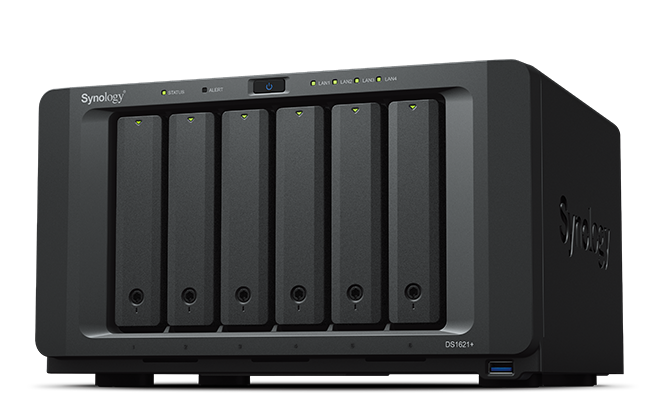
Synology DiskStation DS1621+ and VMware vSphere: The Perfect Combination for Your Home Lab

You’ve likely heard of Synology if you’re a vSphere admin or tech enthusiast. If you’ve done any research into setting up a home lab for testing and learning, you’ve come across the Synology DiskStation DS1621+. Coupled with VMware vSphere, you can create a powerful and versatile virtualization environment to help you learn and implement enterprise virtualization, networking, and storage to keep your skills sharp. This blog series will dive into the DS1621+’s capabilities and how I use it with vSphere.

Continue reading

Free Kubernetes Resources from VMware in 2021

If you’re looking to get started with Kubernetes this year, there’s a lot of great free resources available for you and I’m going to focus on three excellent ones from VMware. The first is KubeAcademy.

KubeAcademy

KubeAcademy is a free, product-agnostic Kubernetes and cloud native technology education program built by experts at VMware. The courses are predominately for beginners but also include intermediate and advanced topics in Kubernetes such as building apps and images, networking, and observability:

Continue reading

Planning the Hardware Requirements for the VMware Cloud Foundation Management Domain, Part 2: Cloud Operations and Automation

In Part 1, we built the hardware build of materials and determined the utilization of a basic VMware Cloud Foundation (VCF) management domain deployment. But we need to put the “cloud” in by adding automation and self-service capabilities provided by vRealize Suite. To accomplish that, we can use SDDC Manager to deploy all the components of the vRealize Suite: Operations, Automation, and Log Insight into the SDDC. In this post, we’ll explore the compute and storage requirements for these components like we did in the previous post. This is going to explore the components required for a single region SDDC. There are a few more steps and components needed for setting up Cross-Region support.

Read more

Planning the Hardware Requirements for the VMware Cloud Foundation Management Domain

When talking with customers about deploying a standard VMware Cloud Foundation (VCF) architecture, the topic of the hardware requirements and details for the management domain are usually glossed over. There’s a basic understanding that it will consist of 4 hosts with sufficient resources to run the SDDC components for the workload domains that it manages. When it comes time for purchasing though, what is the actual hardware that will run the management domain and does VMware have recommended specs for hardware for the management domain?

Continue reading

Valid VMware License Types in Cloud Foundation (VCF) API

When I first start working with an API, I aim for low-hanging fruit. REST APIs, by nature, should be very generic in how they’re interacted with; however, there’s usually small nuances to take into consideration. For example, I recently found out that the VMware Cloud on AWS API uses a csp-auth-token header for authentication and authorization.

While authorization and authentication to the VCF API was straightforward (SDDC Manager username and password), I struggled the first time with POSTing a new VMware license due the API requiring a specific format for productType.

Continue reading

Automating VMware Cloud Foundation with PowerVCF

In a recent post, I wrote about interacting with VCF using the API to add a new license key as a simple way to begin familiarizing myself with the API. As a huge proponent of PowerShell, I began looking for a module to talk to the API but came up empty handed. I began working on a module with vSphere admins in mind because I know the important role PowerShell plays in day-to-day operations. During a conversation with Jase McCarty, he told me about the PowerVCF project which does exactly that! The module was initially developed and is maintained by Brian O’Connell and has 50 cmdlets which covers ~70% of the API calls in VCF 3.9.0:

Continue reading

Where’s My VMware Cloud Foundation License?

A common question I receive from customers is why they don’t see a VMware Cloud Foundation license in the MyVMware portal. What appears instead is licenses for each individual product that make up the VCF edition you purchased. Which is typically:

  • vSphere & vCenter
  • vSAN
  • NSX
  • SDDC Manager
  • vRealize Operations, Automation, and Log Insight
  • Horizon (optional)
  • Enterprise PKS (optional)
Continue reading

Tracking Performance and Usability Enhancements to VMware vSAN Since 6.6.1

I’ve been at VMware for 12 weeks now and continuing to work towards being a vSAN expert. One of my many challenges facing that goal is not only learning the current state of vSAN’s features and capabilities (the latest being 6.7U3) but also learning how vSAN operated in previous versions to articulate to my customers why feature X in this release is relevant to them.

VMware has released updates to vSAN 75 times since the initial release in 2014 and 12 updates in 2019 alone. So where is the best place to start for having a foundational understanding of modern vSAN functionality?

Continue reading